Windows SDK 7.0 을 설치한 후에 Visual Studio 2008에서 소스코드 빌드가 안 되는 일이 발생했다. 이 문제는 Visual Studio 2008이 기본적으로 사용하는 Windows SDK 버전이 6.0에서 7.0으로 바뀌었기 때문에 발생한다. 이럴 때는 레지스트리를 수정해야 한다.
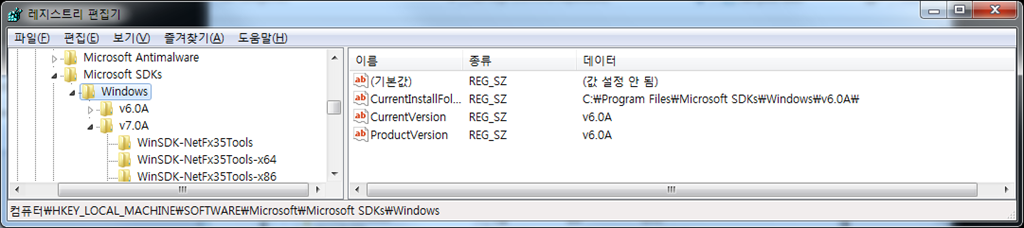
HKEY_LOCAL_MACHINE\SOFTWARE\Microsoft\Microsoft SDKs\Windows로 이동하여,
CurrentVersion을v6.0A로CurrentInstallFolder를C:\Program Files\Microsoft SDKs\Windows\v6.0A\로 바꾸면
문제가 해결된다.
sdk 7 를 설치하면 생기는 메뉴중 visual studio registration 의
windows sdk configuration tool 로 조정할 수 있습니다.
오호 그렇군요. 괜히 힘든 길로 왔네요.